


DailyWeather: Weather Forecast
4.0206.00 Reviews
App Specs
- Version
- 3.7.7.0
- Updated On
- License
- Free
- Downloads
- 1,000,000+
- Developer
- SunnyTech Limited
- Categories
- Weather
- Platform
- Android
Screenshots
 Analysis by AppCompare
I judge a weather app less by how many numbers it can show than by whether it helps me make a sensible choice before I leave home. DailyWeather: Weather Forecast is built for that everyday decision: check what is happening now, look ahead at the day, and decide whether to change the plan, take a coat, or allow extra time. It is a free weather app from SunnyTech Limited, and its straightforward approach will appeal to people who want a quick read rather than a complicated forecasting workspace.
Start with the decision you need to make
The most useful way to approach a forecast is to begin with a real question: Will I be comfortable walking to work? Is an outdoor errand better before lunch? Should I bring something for rain? DailyWeather puts current conditions and upcoming weather in view, so I can use it as a practical first check instead of opening it just to browse figures.
That distinction matters because weather information only helps when it changes an action. For a short trip across town, the current temperature may be enough. For a commute that includes a walk or a wait outdoors, the hourly outlook is more useful: I can compare the timing of my departure and return with the conditions expected across the day. I would check it before getting dressed, then again before leaving if the weather looks unsettled.
The app is aimed at ordinary planning, not at replacing specialist sources for high-stakes decisions. If I were organizing a long mountain route, working outdoors in hazardous conditions, or making a safety-critical call, I would cross-check with an official local weather service. A general forecast can help me prepare, but I would not treat any one phone app as a guarantee.
From forecast to a plan that works
I find the most useful weather check is the one that ends with a practical choice, not a screen full of numbers. In this section, I’ll follow how I’d move from a quick look at conditions to a decision about timing, clothing, or changing an outdoor plan, while keeping a forecast in its proper role: helpful guidance rather than a guarantee.
A quick scan, followed by a closer look
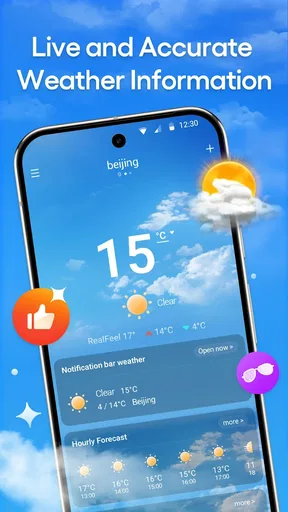
When I open DailyWeather, I can start with the current conditions, then move into the forecast for the next few days. The layout is described as clean and easy to follow, and the useful idea is that I do not need to interpret every detail at once. I can glance at the main conditions first, then tap into information such as humidity or wind speed when it could affect what I am doing.
For example, a mild temperature reading does not automatically mean a comfortable bike ride. Wind can change how exposed a route feels, while humidity can make a warm afternoon feel more tiring. I would use those details as context rather than as isolated scores. The practical habit is to check only the information that can alter the plan: wind for cycling, rain timing for a walk, or the broader outlook when deciding whether to move an outdoor task.
Worth Reading Before You Choose

EA SPORTS FC Mobile 26 Is a Bigger Football Game, but It Takes Time

Flipboard Shows What News Apps Must Do Beyond the Feed

Switching to Android Auto Means Rethinking Your Driving Routine

Google Calendar Makes a Crowded Week Easier to Manage

Ludo King Makes the Most of the Minutes Between Plans

Baby Panda World Brings Quick Play to Modern Phones, but Its Game Library Feels Busy
One useful workflow is to compare the forecast with fixed parts of the day. If I have to be outside at a particular time, I look at the hourly view around that window instead of relying on the daily headline. If I have flexibility, I can look for a more comfortable period and shift the errand. That is a modest but meaningful difference between checking the weather and actually using it.
Use the hourly view to time outdoor plans
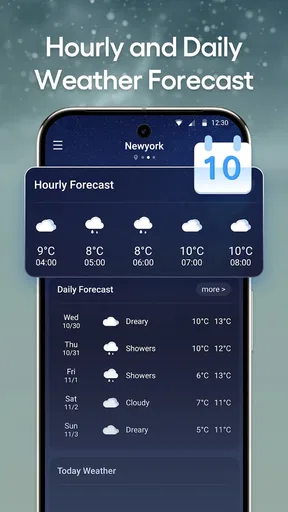
The hourly forecast is one of the app’s most practical tools. Rather than asking only whether rain is expected today, I can look for when conditions may change and decide whether to bring an umbrella or adjust my departure. It is especially useful for plans with a clear start time, such as walking the dog, taking children to an activity, or fitting in a grocery run between other commitments.
A realistic example: I am about to leave for a short walk, but the sky looks uncertain. I check the hourly forecast, see how the next part of the day is expected to develop, and decide whether to go now or wait. If rain appears likely during the return, I can take a rain layer even if the first part of the walk seems fine. I would still treat the forecast as guidance, not a promise; changing local conditions can make a precise plan less certain.
For a weekend outing, I would use the multi-day view to choose a day, then return to the hourly detail closer to departure. That avoids overcommitting to an early forecast while still making it easier to compare options. It is a sensible rhythm for a picnic or a casual day trip, but not a substitute for checking current local guidance before a long or remote journey.
Radar and alerts are useful handoffs, not guarantees
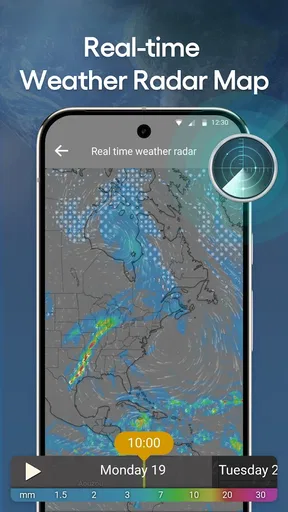
The radar map adds a visual way to inspect weather around a location. I find maps easier than a list of conditions when I am trying to understand whether a system is moving toward my area or away from it. Zooming in can help me think about the immediate neighborhood, although a map should be read as a broad picture rather than as a precise promise about what will happen on one street.
Alerts can also change the way I use the app. Instead of repeatedly opening a forecast to check for severe weather, I can rely on notifications as a prompt to look again. The useful handoff is from notification to verification: if an alert arrives, I would open the app, review the current conditions and radar, and then make a decision. I would not assume that receiving no alert means conditions are automatically safe, especially when local official warnings are important.
Personalization can help keep that workflow manageable. DailyWeather lets users adjust measurement units, themes, and notifications. I would choose the units I already use and keep alerts relevant to my needs; too many notifications can make important ones easier to ignore. If I share a phone with someone who plans differently, it is worth checking those choices rather than assuming one set of units or alert preferences works for everyone.
Where it fits among weather apps
Compared with a built-in phone weather widget, DailyWeather offers more room to inspect details such as hourly conditions, wind, humidity, and radar. A widget may be faster when I only want a glance at the temperature, so I would keep using one for that tiny check if it suits my routine. The app makes more sense when I want to move from a summary to a closer look without switching between several tools.
It also sits between a basic forecast and a specialist weather service. The radar and alert functions give it more depth than a simple temperature display, while its approachable layout is better suited to daily decisions than to technical analysis. Someone who wants extensive storm-tracking controls or professional-grade interpretation may prefer a dedicated service. Someone who wants a readable forecast for errands, commuting, and casual plans is more likely to appreciate this balance.
Fit, friction, and sensible expectations
DailyWeather has an average rating of 4.3 from around 12,000 ratings, and it has been installed over a million times. Those figures suggest it has reached a broad audience, but they do not tell me whether it will match a particular person’s habits. The app is free and rated for Everyone, which makes it easy to try as a general-purpose option. It was released on August 22, 2024, and version 3.7.2.0 is the current version.
The main trade-off is that a clean, accessible presentation can make it tempting to trust a forecast too literally. Weather varies by location and time, and a radar image or hourly estimate is not the same as certainty. I would use the app to prepare, then stay flexible when conditions change. If forecast precision for a specialized activity is the deciding factor, comparing with an official or specialist source is the safer approach.
There is also a small but real setup cost: units, themes, and notification choices are only helpful once they suit the person using the app. A quick first pass through those preferences can prevent awkward readings or unnecessary alerts later. I would start with the defaults, change only what feels inconvenient, and avoid enabling every notification simply because the option exists.
DailyWeather runs on Android 7.0 and later. That gives people with older supported Android devices a route to try it, while iPhone users should look for an iOS version through the relevant store rather than assuming Android availability covers both platforms. For someone already happy with a built-in forecast, installing another app may not add enough value; the case for switching is stronger if hourly timing, radar, and adjustable alerts are features they will actually use.
Who should keep it in the routine?
I would recommend it to someone who checks conditions before commuting, walking, running errands, or deciding whether to move an outdoor plan. It is particularly convenient for people who want a simple overview first and the option to inspect timing and local weather movement afterward. Its everyday tools are most valuable when a forecast can change a small decision without requiring a deep dive.
I would skip it, or at least avoid relying on it alone, if I needed specialist analysis, highly technical weather interpretation, or an authoritative source for a dangerous situation. It may also be unnecessary for someone who only wants the temperature and already gets that from a home-screen widget. The right choice depends less on how many features an app has than on whether those features fit the decisions you make.
First Impressions and User Interface
When you first open DailyWeather, you’re greeted with a sleek and intuitive design. The app’s interface is clean, with a minimalist vibe that doesn’t overwhelm you with too much information all at once. I really appreciate how the weather details are laid out in a straightforward manner. You’ve got your current temperature, forecast for the next few days, and even more detailed insights like humidity and wind speed, all just a tap away.
Features You’ll Love
One of the standout features of this app is its hourly forecast. It’s super handy when you’re planning your day and need to know exactly when that rain is going to hit. Plus, the app provides real-time alerts for severe weather conditions, which is crucial if you live in an area prone to sudden weather changes.
Another cool feature is the radar map. You can zoom in on your specific area and watch the weather systems move in real-time. It’s pretty mesmerizing and also really helpful if you’re trying to dodge a storm.
Customization and Personalization
DailyWeather allows for a decent amount of personalization. You can set up your preferred units of measurement, choose your favorite themes, and even customize the app’s notifications to suit your schedule. I love that it doesn’t bombard you with unnecessary alerts, only focusing on the ones that matter.
Performance and Reliability
In terms of performance, this app runs smoothly without any glitches. The loading times are quick, and the data refreshes instantly, which is exactly what you need in a weather app. I’ve found it to be quite reliable, with accurate forecasts that you can count on.
Final Thoughts
All in all, DailyWeather: Weather Forecast is a solid app for anyone looking to stay informed about the weather. Its user-friendly interface, combined with accurate and detailed forecasts, makes it a must-have for weather enthusiasts and casual users alike. Whether you’re planning a weekend getaway or just trying to avoid getting caught in the rain, this app is definitely worth a download.
So, go ahead and give it a try. You might just find that it becomes your go-to weather app!
Pros
- Accurate forecasts with real-time updates.
- User-friendly interface that's easy to navigate.
- Detailed radar and satellite imagery included.
- Customizable notifications for weather alerts.
- Minimal ads for an uninterrupted experience.
Cons
- Some features require a premium subscription.
- Occasional loading delays during peak times.
- Limited widget customization options.
- Radar imagery can be slow to update.
- No offline mode for remote areas.
FAQs for DailyWeather: Weather Forecast
What features does DailyWeather: Weather Forecast offer?
DailyWeather provides real-time weather updates, 7-day forecasts, and hourly predictions. It includes detailed information on temperature, precipitation, wind speed, and humidity. The app also offers weather alerts, radar imagery, and customizable widgets for quick access to current conditions. Users can personalize their experience with themes and location tracking.
Is DailyWeather: Weather Forecast free to use?
DailyWeather is free to download and use, offering a range of basic features at no cost. However, it also has a premium version available through in-app purchases that unlocks additional features such as ad-free browsing, extended forecast options, and enhanced radar capabilities for more detailed weather analysis.
How accurate is the weather information provided by DailyWeather?
DailyWeather sources its data from reputable meteorological services to ensure high accuracy. While no app can guarantee 100% precision, DailyWeather is designed to give reliable forecasts by using advanced algorithms that analyze multiple data points. User feedback generally indicates a high level of satisfaction with the app's accuracy.
Can I use DailyWeather: Weather Forecast offline?
DailyWeather requires an internet connection to download the latest weather data and forecasts. While some previously downloaded information might be available offline, the most accurate and up-to-date weather details can only be accessed when the device is connected to the internet. It's recommended to check the app online for the latest updates.
How does DailyWeather handle privacy and data security?
DailyWeather takes privacy seriously and only requests necessary permissions, such as location access, to provide accurate weather data. The app's privacy policy outlines how data is collected, used, and stored. It adheres to industry standards for data protection, ensuring that user information is kept secure and not shared with third parties without consent.


